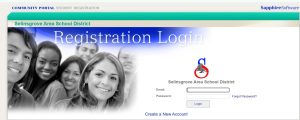
New Student Registration

Welcome to the Selinsgrove Area School District
Student Registration !  

Please be sure to read and follow the directions selecting the correct link below.

Already have a Sapphire Account
and need to enroll a new student? 

If you do not remember your credentials or need assistance to register your student,
please contact Ms. Jennifer Cataldi

Log into your account here 

**NOTES****NOTES****NOTES****NOTES****NOTES****NOTES

  • Please be sure to indicate if the student was previously enrolled at Selinsgrove Area School District
  • Directions found on the Welcome screen are to assist you with a smooth completion of all steps and submission!
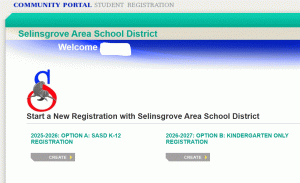
  • If you have more than one student you are registering, return to the landing page and select the correct option to complete for each additional student.

Need a Sapphire Account and
need to enroll a new student?
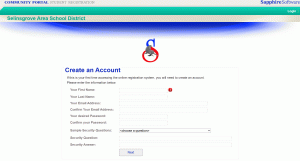
Step One: Parent Sapphire Registration account. Click here to enter your credentials and establish a Sapphire Registration Account.
**This is different than the account you will create in Step Five, where you will monitor and view your student progress as a Selinsgrove Area School District student.  After you have successfully created this account, you will receive an email.  

Step Two:  Check your email for confirmation of your created account.  Follow link to Sapphire Registration Portal with the credentials you just created or click here.  

Step Three: Complete all sections and upload copies of the documents needed to complete each section.  Acceptable formats for images are PDF, jpg, tiff.  Be sure the information is visible and clear.  

Step Four: You will receive a registration confirmation when successfully submitted. 

Step Five:  Sapphire Community Portal is the district notification and communication system where you will receive grades, attendance, assignments, as well as communication regarding the required data verification forms that will need completed and can be found in your student “backpack”. This tool will allow you as the parent/guardian to manage your student’s academic portfolio while here at Selinsgrove Area School District.  Please follow the link found below this picture. 
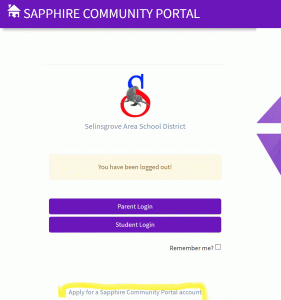
As highlighted in the picture above, complete the “Apply for a Sapphire Community Portal account” here.

Kindergarten Registration 2026-2027
(Must be 5 years of age before September 1, 2026)

Required Documentation

Selinsgrove Area School District shall require that the following information be documented before finalizing student registration:

1. Proof of age:

Any one of the following constitutes acceptable documentation:

  • Birth certificate
  • Notarized copy of birth certificate
  • Baptismal certificate
  • Copy of the record of baptism – notarized or duly certified and showing the date of birth
  • Notarized statement from the parents or another relative indicating the date of birth
  • Valid passport
  • Prior school record indicating the date of birth
2. Proof of Residency:

Any one of the following constitutes acceptable documentation:

  • A current deed
  • A mortgage statement no more than three months old
  • An active residential lease agreement
  • A utility bill no more than three months old
  • An internet bill no more than three months old
  • A credit card bill no more than three months old
  • A bank statement no more than three months old
  • A tax bill no more than three months old
  • An insurance document no more than three months old
  • A piece of mail sent in the past three months by the federal or state government such as benefits information, voter registration, or tax documents
3.  Immunizations required by law

Any one of the following constitutes acceptable documentation:

  • Child’s immunization record
  • A written statement from the former school district or from a medical office that the required immunizations have been administered, or that a required series is in progress
  • Verbal assurances from the former school district or a medical office that the required immunizations have been completed, with records to follow.

Library of resources and forms

  • School Vaccination Requirements
  • Parents are encouraged to have your family physician complete the required School Physical Exam required in grades K, 6 and 11.   Dental Exams are also required in grades K, 3, and 11.  If you desire to have your student participate in the school conducted exams, you will find the parent consent below.
  • If you desire to have your student’s physical exam and dental exam conducted by your family providers.  Please download the forms below and have your providers complete, sign and return to the school nurse.  
    • Department of Health Physical Exam Form –here
    • Department of Health Dental Exam Form – here